Tuesday, March 29, 2011

Organizing on a Budget


While the current economic state is still in recovery mode, I am in spring cleaning mode, so I thought that I'd put together a melange of options and ideas for organizing on a budget this spring. It is completely possible with some creativity and time!


Let's start with the kitchen since that's where I started my spring cleaning this year.

Stackable Bamboo Organizers


These are perfect for silverware, utensils or even your junk drawer or office drawer. As low as $2.99 at The Container Store - wow!

Mesh Packet Holder


I have to admit, here, that I had never seen this before! I love this idea and really think I'm going to get one of these. We all have single packets of this that and 12 other things in our pantry, but this is an excellent idea on keeping them together and organized. Nice job Container Store.


Silver Mesh Storage Bin


If only I had more of these! I've got a mesh storage bin like this in my pantry where I keep coupons, pens, pencils and post-it notes.

Cupboard Shelf


I have a couple wire shelves that I stick in my cupboards for extra elevated storage. They are wonderful! The best ones I have are in my bathroom cupboard and under the sink - they maximize space and promote the ease in finding your stuff.

Cabinet Organizers
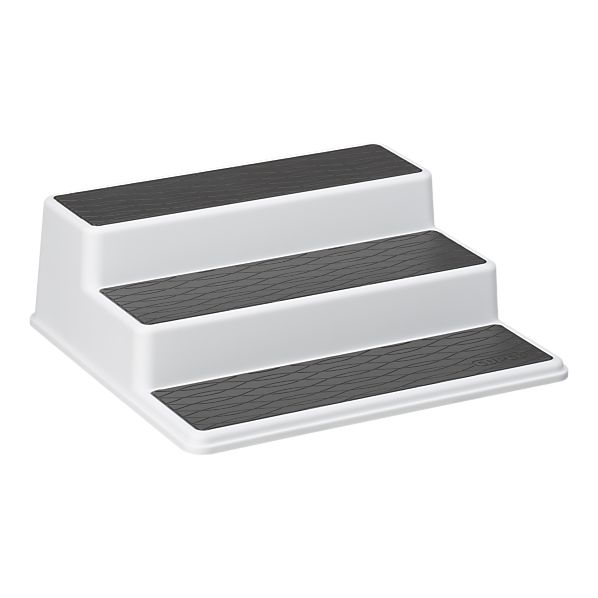


If you have as many spices as I do - this is a great organizational tool for being able to find spices in the back of the cabinet.

Spice Jars


I love the idea of transferring store-bought spices into cute individual jars. These are adorable. And totally multi-functioning - you could use this easily as a multi-tasker.


Ceiling Pot Rack


This is a fantastic space-saving idea if you have an excess of pots & pans and not much extra storage space to give.

Let's move to closet and storage organization.


Over the door hooks


These are a wonderful space saving option for bathrooms, closets, storage rooms and kids play rooms. $2.99 from The Container Store is a great steal!

Over-the-door shoe organizers


There are tons of options for over-the-door shoe organization currently on the market. Here is Crate & Barrel's take.

Shoe Storage


Keeping your shoes off the floor allows for a clutter-free closet. This is a great solution to storing your shoes on the floor.


Sweater Bag Drawer


Don't have enough room in your closet for your winter and summer clothes? That's ok - grab a few sweater bags or containers and slide them under your bed with your seasonal apparel.


The Container Store is currently in Spring Organizational Sale mode - click here to find the closet location to you.

I happen to enjoy Crate & Barrel and The Container Store; neither company knows who I am or is in any way affiliated to Organized Ali. I write about products I use or would like to use.


Read More!

Craft Room Organization

Here is a great organizational blog post from my friends at Etsy. Check it out here. Because Etsy is an artsy craftsy website, the article provides inspiring ideas for craft and scrapbook room and inventory organization. Love.
Read More!

Monday, March 21, 2011

Happy Spring... Cleaning!

Spring is finally here! I know much of the nation has had a very rough winter and is thrilled at the sight of spring. Now that it is officially here, it's time to jump into spring cleaning! Well, in my house it is anyway. I know that spring cleaning is a daunting task for anyone, myself included. It's really not that much fun to spend hours or days inside cleaning the house. I like to break up my spring cleaning tasks so that it doesn't feel quite so overwhelming.


Yesterday I marked the start of spring by tackling most of my kitchen. Sometime this week I plan on scrubbing my bathroom until it shines. Other spring cleaning tasks will just have to wait until April.

If you're one of those people who is too busy to even think about spring cleaning but knows it needs to happen, I have some tips for you on how to do just that:

*Start by making a list of what needs to be cleaned in your house - if you've got a really long list, as most people do, break it down by room or section of your house.

*Choose the one room or project that is of the highest importance and continue to rank order your list of tasks until it is prioritized.

*Now it's time to take a close look at your #1 priority and break that down into specific tasks. For example, in my kitchen I made a specific "to do list" so that I could cross off the little things I did instead of having to clean out the entire kitchen all at once.

Kitchen:
-Wipe out refrigerator
-Wipe out freezer
-Clean cabinet faces
-Wipe down pantry shelves, clean out
-Scrub oven inside
-Wipe out oven drawer
-Detail appliances
-Complete recipe organization

*Once you have come up with your specific task lists for each room or area in your house it's time to dedicate some time to accomplishing these tasks. I think it's perfectly acceptable to spend all spring getting this stuff done because, well, it's no fun and it's a lot of work. If you're one of those people who'd prefer to get everything done in a weekend - fine, clean your heart out!

*I like allocating part of a day most weekends to spend time knocking out tasks, plus I can usually afford to sacrifice one night each week to get some stuff done at home. After all, it's lighter out now and I usually have more motivation to be productive when I can see daylight.

*Don't forget about adding projects that you've been putting off to your spring cleaning list. Some of mine are: hanging art on the walls, vacuum cobwebs/clean out unfinished portion of my basement, and clean the car!

Read More!

Sunday, February 6, 2011

Organizing using Microsoft OneNote

I have found my new favorite computer program. Microsoft OneNote. Have you heard of OneNote? No, you say? You’re in luck: if you have Microsoft Office 2003 or later, I believe you will have OneNote.

What in the world is OneNote, you ask?


It is like having a notebook on your computer that you can do anything you would do with a regular old notebook or piece of paper.

Here are some things I have come up with where you could use OneNote:

*Taking notes in class
*Writing notes from a meeting at work
*Making a to-do list
*Creating a shopping list
*Managing a project
*Minimizing paperwork/messy buildup
*Maximizing productivity for work and school by connecting OneNote projects with Outlook (!!!!)

What makes OneNote so special?

If you're familiar with Microsoft Word, you'll probably find a lot of similarities to OneNote; however, there are a lot of things that you can do on OneNote that you can't do on Word. The most important being linking your OneNote notes or lists to your Outlook. If you create a to-do list on OneNote you can link it to your task list on Outlook with the click of a button. Better yet, you can pin a "side note" to your desktop to remind you of something that needs doing.

For those of you who are doodlers, getting bored in class can now be spent doodling in the margins of your electronic notebook just as you would if you were using a piece of paper. Drawings or mathematical formulas can be turned into text or a computer generated symbol.

Best of all: OneNote reduces clutter and saves time by eliminating the use of paper. I don't know about you, but I would much rather sort through a well-organized folder on my desktop than page through a spiral-bound notebook trying to find a to-do list or my notes from Biology 101. You can use OneNote on your PC or on your smartphone. I have not downloaded the app yet, but plan to do so!

My Current OneNote Project:


I am preparing to embark on some new housing projects, mostly filling my house with furniture, adding some organizational features to a couple closets and work on making our outdoor space amazing so we can enjoy every moment of the sunny Seattle summers (I think we’re on day 143 of rain right now). I decided to use OneNote to help organize some of my thoughts and ideas.

By using OneNote I was able to create a page for each room or space that we’re looking at making changes to. Each page lists the items we are planning to purchase or the projects that need to be done. Because of how OneNote allows you to make notes like it’s a piece of paper I can copy and paste pictures, images or swatches to help me keep track of different options. With things like our “Major Projects” I can keep track of bids and estimates we get, as well as the contractors and their contact information. I can highlight different items to note their priority status. I can check things off when I purchase them or complete a task (or I can cross it off).

So far I am really enjoying OneNote. I plan to utilize this program to be more organized at work by linking notes/to-do lists to my Outlook. I haven’t gotten this far yet, but I can tell you I am really looking forward to it. I think that OneNote and Outlook are the two best organizational features you can have on your computer.

For more information about OneNote, check out these websites:

Demo of OneNote

Download a trial

More to come next time: Windows Live SkyDrive and why it deserves a gold star.

Microsoft Corporation has no idea who I am. I am only writing about their products because I use them and love them. Microsoft is no way a sponsor of this blog.


Read More!

Friday, January 28, 2011

Glass Food Storage Containers

America's Test Kitchen just posted a review of glass food storage containers. Last summer I made the switch from plastic reusable containers to glass, due to the hype about microwaving plastic. I really like using glass containers and feel that they will last much, much, much longer than plastic ones.


Click for the review from the experts.

I use Pyrex glass containers and really like them! I purchased 2 sets of 3 various size bowls, as well as a set of rectangular storage containers. One thing I like about the bowls is that it's great for portion control because it lists the number of cups that it can hold.


The rectangular containers are terrific for sandwiches.

Of course, all of these containers can be used for other things than bringing your lunch to work or school. Keeping paperclips and office supplies or storing bobby pins and hair binders are the first things that come to mind on how to make these multi-taskers.


Read More!

Saturday, January 15, 2011

Recipe Organization

The need for a recipe organization makeover comes with a love of cooking. Pursuant to a conversation I had with a friend, Nora, over the holidays, I decided to revamp my need to maintain organization with all of my “loose” recipes. I have my fair share of cookbooks, which require little effort to keep organized, but where the challenge lies is the recipes I print off the internet and the recipes I rip out of my many cooking magazine subscriptions.


I was able to house my loose recipes in file folders until I filled two to capacity and couldn’t find anything. If you only have a few favorite recipes, this could work well for you; however, those of you who see a picture of something delicious and decide to rip it out of the Food Network Magazine like I do… well, you need something bigger and better to stay sane and also to save time.

One of the problems I had with keeping all of my recipes in file folders was that I would have to sort through hundreds of recipes just to find something to eat for dinner or to find a favorite recipe that I wanted to try again. No fun that is. So I picked a beautiful rainy evening (living in Seattle, I have had many to choose from!) and went through all of the recipes about four times trying to consolidate and weed out the recipes I just knew I would never ever try. You’d be surprised how many I got rid of!


Then….. I came up with several categories and sorted recipes based on categories, including: baking, breads, meat, chicken, fish, brunch, sandwiches, slow cookers, sauces, soups, salads, beverages, holiday, ethnic, pasta, etc. After categorizing the recipes I went out and found a recipe organization book on Amazon.com. It took me quite a while to narrow down which book to buy; my selection was based mostly on the categories on the dividing tabs that it came with. I chose a C.R. Gibson recipe organizer; C.R. Gibson makes a lot of different recipe organization paraphernalia you might be interested in. I’d recommend browsing Amazon to find a wide variety. There are certainly plenty to choose from! Be advised that these binders don’t come with too terribly many sheet protectors, so you may want to run out and get a pack of them. I quickly ran out!


Aside from the greatness in organization, one of my favorite parts of the new recipe binder is that all of my recipes are kept in sheet protectors, which allows me to wipe off all of the cooking remnants after I’m done with the recipe. I can always tell what recipes I’ve tried before because they have been destroyed.

Another organizational tool I employ for my recipes is for the 3x5” notecard size recipes I print from the internet. Mostly these are from www.allrecipes.com, a personal favorite site of mine (I keep an online recipe box here, too!). I keep these in a little notecard box that I used to use for school, I think. There are some great notecard boxes on the market that will fit 3x5 or 4x6” recipe cards. I like this idea, too, because it’s alphabetized. I usually remember the name of the recipe that I am looking for if I liked it, so I can find it pretty quickly; but regardless of the recipe’s name, I keep all chicken in the “c” and all pasta in the “p” instead of having, say, “Anniversary Chicken” in the “a” category or “Lemon Pasta” in the “l” category. I just think that’s easier to keep track of everything.


I have to tell you, though, my dream kitchen would include a touch-screen computer in my that pops down from under the cabinet and magically stores all of my recipes and allows me to view online recipe collections for easy kitchen access. I have a feeling I’ll be dreaming for a while.


P.S. – you may be wondering how I keep this system up! That is a “resolution” for me this year. I have subscriptions to three (or more?) food magazines. I have formed some new habits around ripping recipes out of these magazines, due to the fact that with all of the recipes in my house I would need to try a new recipe every day at every meal time for about 900 years in order to actually try something, so I am only allowing myself to rip out a recipe if I am really going to make it. I do look through the ingredients and determine if that’s something I’m even remotely interested in, and if so, then it comes out and goes into a file folder. Yes, a file folder. Also, I should note, after I page through each magazine and determine what I'm going to use, I recycle the magazine, so as to avoid messy buildup. Well, actually, I keep my Cooks Illustrated magazines, but only because every page is filled with delicious goodness and fantastic tips.

From that point, I plan my weekly menus around new recipes. Err, I try to, anyway. If I try the recipe and enjoy it, it goes in my recipe binder, if not, it goes to the curb. So far this is working for me, but I have a lot of new recipes to try and a very, very excellent new cookbook from friend Nora that I am ecstatic about (Williams-Sonoma’s Cooking at Home)…. Off to the kitchen I go!

Read More!

Wednesday, January 5, 2011

2011... A Year of Organizing

Happy New Year!

I don't really do the whole "resolutions" thing at new years, more like a "wish" or a "goal" for me. You better believe I have some serious organizing goals and wishes for this great new year. I will share how and when they become accomplishments as we continue through what I hope to be a great year.


I'd really, really, really like to get my recipes under control. I cook a lot, therefore I have at least a million recipes in my kitchen. This is a great project for rainy Seattle winter evenings.

File cabinets for my files would be a great goal to strive for this year.

A place to put the mail that isn't on my kitchen counter is something I'm hoping will come very, very soon! Nobody likes clutter or bills in the kitchen. That's supposed to be the happiest place in the house.

My home office could use some attention and love and de-cluttering.

I'd like to figure out how to use Google apps to its fullest potential. Google/"G" anything and I are not the best of friends. I am an Outlook/Microsoft girl all the way.

Lastly, I resolve to write on this here blog more! Stay tuned.

Read More!